Get Your Website Ready: Optimize According to Google’s Algorithm Updates

Google’s search algorithm is changing, like all the time, to bring back more relevant, high quality stuff for people. For companies, this kinda means that just having a website isn’t really enough anymore. If you want to keep showing up in search results, then your site has to be tweaked and refined continuously , based on the newest algorithm updates.

In 2026, Google seems to be leaning harder on user experience, content quality, how fast pages load, and those trust signals. When you actually understand what’s shifting, and then adjust your website to match , your organic reach can jump a lot, plus you get steadier long term digital progress. 

Why Google Algorithm Updates Matter

Google updates itss algorithm now and then, mostly to improve how search results work and also to get rid of low value or “spammy” stuff. Because of those changes your website rankings can move around, sometimes better, sometimes worse, not always the same way.

If your website is not optimized according to current guidelines, you may experience:

  • Drop in search rankings
  • Reduced organic traffic
  • Lower conversion rates
  • Poor visibility on competitive keywords

That’s why staying updated is essential for business growth.

Focus on High-Quality Content

Content remains one of the strongest ranking factors. Google prioritizes websites that provide clear, helpful, and original information.

To align with updates:

  • Write content that solves user problems
  • Avoid keyword stuffing
  • Update old blog posts regularly
  • Use simple and clear language
  • Focus on search intent, not just keywords

High-quality content builds trust and improves long-term rankings.

Improve User Experience (UX)

Google increasingly evaluates how users interact with your website. A poor user experience can negatively impact rankings.

To improve UX:

  • Ensure easy navigation
  • Use clean and mobile-friendly design
  • Reduce unnecessary pop-ups
  • Improve page readability
  • Make important information easy to find

A smooth user experience increases engagement and reduces bounce rates.

Optimize for Core Web Vitals

Core Web Vitals are essential performance metrics that measure loading speed, interactivity, and visual stability.

Key areas to improve:

  • Largest Contentful Paint (LCP)
  • First Input Delay (FID) / Interaction responsiveness
  • Cumulative Layout Shift (CLS)

Optimizing these metrics helps your website load faster and perform better in search results.

Mobile-First Optimization

Google uses mobile-first indexing, meaning it primarily evaluates the mobile version of your website.

Ensure your website:

  • Is fully responsive
  • Loads quickly on mobile devices
  • Has readable text without zooming
  • Uses mobile-friendly navigation

A strong mobile experience is now a ranking necessity, not an option.

Strengthen E-E-A-T Signals

Google uses E-E-A-T (Experience, Expertise, Authoritativeness, Trustworthiness) to evaluate content quality.

To improve E-E-A-T:

  • Showcase business credentials and expertise
  • Use author information for blog content
  • Build high-quality backlinks
  • Maintain accurate and updated information
  • Secure your website with HTTPS

Strong trust signals improve your credibility in Google’s eyes.

Improve Technical SEO

Technical SEO ensures that search engines can crawl and index your website efficiently.

Important factors include:

  • Proper sitemap submission
  • Optimized robots.txt file
  • Clean URL structure
  • Fixing broken links
  • Structured data implementation

A technically sound website improves indexing and ranking stability.

Optimize for Search Intent

Modern  SEO (Search Engine Optimization) is less about exact keywords and more about understanding what users are looking for.

There are three main types of search intent:

  • Informational (learning something)
  • Navigational (finding a brand or page)
  • Transactional (buying or hiring services)

Matching your content to the correct intent increases engagement and conversions.

Regular SEO Monitoring

SEO is not a one-time task. Continuous monitoring helps you stay aligned with Google’s updates.

Track:

  • Keyword rankings
  • Organic traffic performance
  • Bounce rate and engagement
  • Technical issues
  • Page speed metrics

Regular audits help you quickly fix problems before they affect rankings.

Final Thoughts

Google’s algorithm updates are basically meant to reward sites that put real users first, not just the search engines. If a business stays locked in on solid content, good technical performance and a smooth user experience, they generally end up ahead , in rankings, even when things keep shifting.


Instead of scrambling after every little change, it’s smarter to build a sturdy SEO base that lines up, kind of naturally, with what Google expects.


At YouthTech Solutions LLP, we assist companies in building and improving websites so they’re ready for each major Google update. From technical SEO to content strategy and performance tuning, we make sure your website stays competitive in this always moving digital world. 
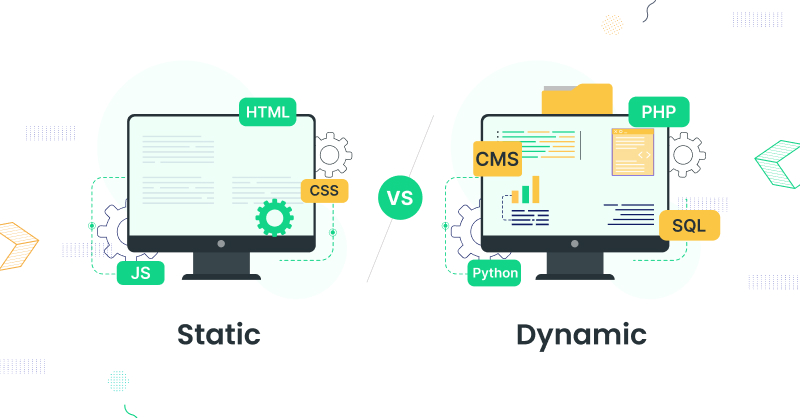
Static Website vs Dynamic Website: Which One Does Your Business Actually Need?

When you’re planning a business website , one of the first things you’ll end up juggling is deciding between a static website and a dynamic one. And yeah, it sounds simple at first , but it is more important than it seems because it touches your website’s cost, speed, flexibility , and that long-term scalability you’ll care about later.

In 2026 , companies aren’t only chasing an online presence , they’re trying to build a place that actually supports growth, marketing efforts, and customer engagement. When you understand the difference between static and dynamic websites, you’ll be in a better position to pick the right base or framework for your digital success, sooner rather than later. 

What Is a Static Website?

A static website is made up of fixed web pages where content remains the same for every visitor. These pages are built using basic technologies like HTML, CSS, and sometimes JavaScript.

Each page is pre-built and delivered exactly as stored on the server. If any changes are needed, the developer must manually update the code.

Static websites are commonly used for:

  • Business landing pages
  • Portfolio websites
  • Company information websites
  • Small informational websites

Because they are simple in structure, static websites are fast, lightweight, and easy to host.

What Is a Dynamic Website?

A dynamic website generates content in real time based on user interaction, database content, or backend logic. These websites are built using technologies like PHP, Python, Node.js, and databases such as MySQL or MongoDB.

Dynamic websites allow users to interact with the platform, such as logging in, submitting forms, making purchases, or viewing personalized content.

Examples include:

Dynamic websites are highly flexible and designed for functionality beyond simple information display.

Key Differences Between Static and Dynamic Websites

The main difference lies in how content is delivered and updated.

Static websites display fixed content, while dynamic websites generate content based on user actions or database inputs.

Static websites are faster and cheaper to build, but they lack flexibility. Dynamic websites are more powerful and scalable but require more development effort and maintenance.

Performance and Speed

Static websites are like really fast, because they just ship pre-built files right to the users. There isnt any need for database stuff , and there is no real server side computation happening.  

Dynamic websites tend to feel a bit heavier, since they handle incoming requests, they talk to databases, and they generate content in real time too. Even so, with today’s optimization methods, plus caching tricks that help a lot, these dynamic sites can still land on excellent performance, in practice. 

Maintenance and Updates

Static websites require manual updates for every change. This can become time-consuming if the website needs frequent content updates.

Dynamic websites allow content to be updated easily through admin panels or content management systems. This makes them more suitable for businesses that regularly update blogs, products, or services.

Scalability

Static websites are kinda good for small-scale stuff where the content stays mostly the same , for a while. Still, they are not really great for growing businesses, especially if they need frequent updates or more advanced features.

Dynamic websites on the other hand, are very scalable . They can handle thousands of users , huge databases , and pretty complex functionalities , so they end up being a better fit for long-term business expansion.

Security

Static websites are generally more secure because they do not rely on databases or server-side processing, reducing the risk of attacks.

Dynamic websites require stronger security measures because they involve databases, user inputs, and backend logic. However, with proper development practices, they can be made highly secure.

Cost Factor

Static websites are kinda more cost effective and, pretty quick to build. Theyre usually a good fit for startups or small businesses that have limited budgets, and well, not a lot of time to waste.

Dynamic websites, on the other hand, take more time and resources to develop. So they can feel more expensive at first. Still, they tend to bring better lasting benefits for companies that need actual functionality, plus room to grow over time. 

Which One Should Your Business Choose?

A static website is the right choice if your business needs:

  • A simple online presence
  • Limited content updates
  • Fast loading speed
  • Low development cost
  • Informational website or portfolio

A dynamic website is the better option if your business requires:

  • User interaction and login systems
  • E-commerce functionality
  • Regular content updates
  • Scalability for future growth
  • Advanced features and integrations

Final Verdict

In the “static vs dynamic” website debate there really isn’t one clear universal winner. Honestly it comes down to what you’re trying to achieve for your business, that’s the main point.

If what you need is something simple, quick, and easy on the budget then a static website can be totally enough. But if your focus is more on growth, stronger customer engagement, and long-term scalability, then a dynamic website is the smarter pick, and it usually pays off later.

At YouthTech Solutions LLP, we guide businesses to pick and build the right kind of website that matches their goals , their budget, and also their plans for future expansion. Whether you’re after a lightweight static site, or a more powerful dynamic web application , laying the right groundwork can make a noticeable difference to your online results.

On-Page SEO Checklist for Indian Business Websites: 25 Points to Check Today

If your website for business isn’t ranking great on search engines, the cause might not be only your rivals. A lot of times, weak on page SEO blocks even well made websites from reaching their full value.

On- page SEO is mostly about tuning the parts inside your website that help search engines understand what you write, while also upgrading the overall user experience. If you’re running a startup, a nearby local business, or an eCommerce storefront, sticking to a solid on-page SEO approach can really boost your visibility, and pull in the right, qualified visitors. Even if it sounds simple, it’s the kind of “small” work that tends to add up, pretty fast.

Use this 25 point checklist, to make sure your website is set up for stronger rankings in 2026.

1. Optimize Your Title Tags

Make unique, keyword packed title tags  for every page so they stay under 60 characters, for search results to show them properly

2. Write Compelling Meta Descriptions

A good meta description kinda gets folks to click on your page. Try keep it around 150-160 chars, and slip in your primary keyword  naturally, ok?

3. Use One H1 Tag Per Page

Every page should have a single H1 heading that clearly describes the page’s primary topic.

4. Structure Content with H2 and H3 Headings

Headings improve readability and help search engines understand your content hierarchy.

5. Include Your Primary Keyword Naturally

Place your target keyword in the title, first paragraph, headings, and throughout the content without keyword stuffing.

6. Optimize URL Structure

Use short, descriptive URLs that include relevant keywords and avoid unnecessary numbers or symbols.

7. Improve Page Loading Speed

Fast-loading websites offer a better user experience and contribute to improved search rankings.

8. Ensure Mobile Responsiveness

Most users browse websites on mobile devices. A responsive design is essential for both user experience and Search Engine Optimization.

9. Add Internal Links

Link related pages within your website to improve navigation and distribute page authority.

10. Include External Links When Relevant

Linking to credible sources can enhance content quality and provide additional value to readers.

11. Optimize Images

Compress images to reduce loading time and use descriptive file names.

12. Add Alt Text to Images

Image alt text improves accessibility and helps search engines understand image content.

13. Use Schema Markup

Structured data kinda helps search engines understand your content a lot better, and yeah it can even make your search appearance look more improved.

14. Create High-Quality Content

Write original, informative, and user-focused content that genuinely answers visitors’ questions.

15. Avoid Duplicate Content

Each page really ought to give something unique value, otherwise duplicate content can mess up search performance a bit, like it won’t rank as well.

16. Improve Readability

Use short paragraphs, simple language, and clear formatting to keep readers engaged.

17. Optimize for Local SEO

If your business serves customers in India, include relevant city or regional keywords where appropriate and maintain consistent business information across your website.

18. Add Clear Calls-to-Action

Guide visitors toward meaningful actions such as contacting your business, requesting a quote, or learning more about your services.

19. Secure Your Website with HTTPS

A secure website builds user trust and is an important ranking factor.

20. Fix Broken Links

Check for broken internal and external links that may negatively impact user experience.

21. Optimize for Core Web Vitals

Monitor loading performance, visual stability & responsiveness to provide a smooth browsing experience.

22. Use SEO-Friendly Anchor Text

Internal links should use descriptive anchor text instead of generic phrases like “Click Here.”

23. Add an XML Sitemap

XML sitemap helps search engines crawl and index your website more efficiently.

24. Check Robots.txt

Robots.txt file allows search engines to crawl important pages while blocking unnecessary ones.

25. Monitor SEO Performance Regularly

Track rankings, traffic and technical issues to continuously improve your website’s performance.

Final Thoughts

On-page SEO is basically the groundwork for long-term wins in search engine performance. Even small upgrades in page structure, the quality of the content, page speed, and the overall user experience can end up helping with higher rankings , and more organic visitors as time goes by. 

Rather than only chasing keywords, businesses ought to put more energy into making truly valuable content, keeping technical standards strong , and offering a smooth experience for people who land on the site.

React JS vs. Vue JS: Which Frontend Framework Is Best for Your Web Project in 2026?

Choosing the right frontend framework is, kind of, one of the most important calls you can make when building a modern website or web application. The frontend pretty much handles everything users see and touch, so it really matters if you want a fluid, speedy and engaging experience

When you look at the most used JavaScript frameworks, React JS and Vue JS stand out as two of the popular picks for teams and companies. They both bring strong capabilities and good performance, yet they were made with different ideas in mind. So if you’re starting a new web project in 2026, it helps to understand how React differs from Vue, then you can decide without guessing too much 

What Is React JS?

React JS is basically an open-source JavaScript library, which is used for building interactive user interfaces, especially when you have single page applications (SPAs). It is component-based so developers can build reusable UI bits that make coding a bit easier and also calmer to maintain.

In general, React is often known for its flexibility, broad ecosystem, and for the way it can deal with large scale applications. It also fits well with different libraries and tools, so it ends up being a preferred choice for organizations that are building complicated, and scalable web products. 

What Is Vue JS?

Vue JS is this progressive JavaScript framework, basically made to keep frontend work simple and efficient, you know. It comes with an intuitive structure, so it feels easier for developers to get started and actually implement things compared to a lot of other frameworks.  


Vue sort of brings together the most useful sides of modern frontend development with a soft learning curve, not too harsh. That’s why it works well for startups, small businesses, and for projects where you need quick delivery or fast build cycles, rather than taking things slow. 

Performance Comparison

Both React JS and Vue JS can deliver great performance. They rely on virtual DOM technology, so only the required sections of a webpage get updated, instead of doing a full page refresh. And this kind of approach tends to make rendering faster, plus the whole experience feels more fluid for the user.

For the majority of business websites and web apps, the actual performance gap between React and Vue usually is small. In practice, things like the overall application architecture, along with disciplined coding habits, often matter more for speed than the framework choice itself. 

Learning Curve and Development

Vue JS is widely considered easier to learn because of its straightforward syntax and well-organized documentation. Developers familiar with HTML, CSS, and JavaScript can often become productive with Vue quickly.

React has a slightly steeper learning curve, especially for beginners. Developers need to understand concepts such as JSX, state management, and component lifecycle. However, once mastered, React provides exceptional flexibility for building sophisticated applications.

Scalability

For businesses planning long-term growth, scalability is an important consideration.

React is highly scalable and is commonly used for enterprise applications, customer portals, SaaS platforms, and complex dashboards. Its extensive ecosystem allows developers to integrate advanced features as business requirements evolve.

Vue also supports scalable applications but is generally preferred for small to medium-sized projects where simplicity and faster development are priorities.

Community and Ecosystem

React kinda has one of the biggest developer communities in the world, so in practice businesses get to use all that abundance of learning material, plus third-party libraries, a bunch of development tools, and yes experienced developers too.

Vue also has an active growing community. And the ecosystem keeps expanding, so you end up with great documentation, along with several plugins that kind of make development simpler in day to day work.

Both of these frameworks stay updated regularly, and they do have solid community support, which helps them stay dependable options for modern web development even as things change. 

When Should You Choose React JS?

React is an excellent choice if your project requires:

  • Enterprise-level web applications
  • Custom dashboards and portals
  • SaaS platforms
  • Highly interactive user interfaces
  • Long-term scalability
  • Complex frontend architecture

Its flexibility makes it suitable for businesses expecting continuous growth and feature expansion.

When Should You Choose Vue JS?

Vue is a great option if your project involves:

  • Business websites
  • Startup applications
  • Admin panels
  • Small to medium-sized web applications
  • Rapid development
  • Projects with limited development time

Its simplicity allows developers to build high-quality applications quickly while maintaining clean and organized code.

Final Verdict

Both React JS and Vue JS are kind of outstanding frontend technologies in 2026. Neither framework is always the best one, honestly the “right” choice depends on your project goals, budget, the development timeline and also the future scalability needs, sort of.  

If you are working on a big, feature-rich application that you expect to grow for years, React JS tends to give more flexibility and a mature ecosystem that’s pretty solid. On the flip side if you are aiming for faster delivery, smoother upkeep, and a gentler learning curve, Vue JS becomes a really good pick.  

At YouthTech Solutions LLP, we help companies pick the most fitting frontend option based on their specific, unique requirements. Whether you’re creating a corporate site, a customer portal, or a custom web application, our team builds modern, responsive, and scalable solutions that support long term business progress.

Check our all news